UNIVERSIDAD NACIONAL EXPERIMENTAL
"SIMÓN RODRÍGUEZ"
NÚCLEO PALO VERDE

CONTENIDO PROGRAMÁTICO

TEMA 1: GENERALIDADES.

1. DEFINICIÓN DE FINANZAS.
2. CONCEPTO DE FINANZAS INTERNACIONALES.
3. IMPORTANCIA DE LAS FINANZAS INTERNACIONALES.
4. NOMENCLATURA USADAS EN LAS FINANZAS INTERNACIONALES.
5. VALOR DE CAMBIO CON RESPECTO AL DÓLAR Y AL EURO.
6. TIPOS DE OPERACIONES INTERNACIONALES.
7. VENTAJAS Y DESVENTAJAS.

TEMA 2: BALANZA DE PAGOS.

1. CONCEPTO, CARACTERÍSTICAS, TIPOS DE CUENTAS.
2. REGISTRO DE LAS OPERACIONES CONTABLES.
3. PROBLEMAS EN EL REGISTRO DE LAS OPERACIONES EN LA BALANZA DE PAGOS.
4. ANÁLISIS DE LOS EFECTOS DE LA BALANZA DE PAGOS.
5. DESCRIPCIÓN DE LA BALANZA DE PAGOS EN VENEZUELA DESDE EL AÑO 2005 HASTA EL PRESENTE.

TEMA 3: SISTEMA MONETARIO INTERNACIONAL.

1. CONCEPTO DEL SISTEMA MONETARIO INTERNACIONAL.
2. SISTEMA PATRÓN ORO: DEFINICIÓN Y FUNCIONAMIENTO.
3. SISTEMA BRETÓN WOODS: CONCEPTO Y CARACTERÍSTICAS, COMPORTAMIENTO DESDE 1944 HASTA EL PRESENTE.
4. INSTITUCIONES FINANCIERAS INTERNACIONALES: FONDO MONETARIO INTERNACIONAL: SU CREACIÓN, FUNCIONES, TIPOS DE SERVICIO QUE PRESTA, ROL DE ESTOS ORGANISMOS A NIVEL GLOBAL EN LOS ÚLTIMOS AÑOS.
5. BANCO MUNDIAL: CREACIÓN, FUNCIONES, TIPOS DE SERVICIO QUE PRESTA Y ROL DE ESTE ORGANISMO MUNDIAL EN LOS ÚLTIMOS TIEMPOS HASTA EL PRESENTE.
6. BANCO INTERNACIONAL DE PAGO (COMPENSACIÓN): ACUERDO DE BASILEA: SU CREACIÓN, FUNCIONES Y TIPOS DE SERVICIO QUE PRESTA.
7. SISTEMA MONETARIO EUROPEO: CREACIÓN, ESTRUCTURA, FUNCIONES Y TIPOS DE SERVICIO QUE PRESTA.
8. LA MONEDA EURO: COTIZACIÓN, ESTRUCTURA (CANASTA DE VARIAS MONEDAS).
9. DERECHO ESPECIAL DE GIRO: CONCEPTO, FUNCIONES Y ESTRUCTURA.

TEMA 4: MERCADO CAMBIARIO.

1. CONCEPTO DE DIVISA.
2. MERCADO DE DIVISAS.
3. OPERACIONES DE CAMBIO EN EL MERCADO INTERNACIONAL.
4. TIPOS DE COTIZACIONES DE CAMBIO.
5. CONTRATOS A FUTURO (FORWARD): CONCEPTO, FUNCIONES Y TIPOS DE CONTRATOS.
6. SISTEMA CAMBIARIO DE BANDAS: DEFINICIÓN Y FUNCIONAMIENTO.
7. RIESGO CAMBIARIO: CONCEPTO, ELEMENTOS FUNDAMENTALES DEL RIESGO CAMBIARIO: POSICIÓN CORTA Y POSICIÓN LARGA, TIPOS DE RIESGOS DE CAMBIO: TRANSACCIÓN DE BALANCE Y ECONÓMICO, ENDEUDAMIENTO EMPRESARIAL EN MONEDA EXTRANJERA.
8. COMPORTAMIENTO DEL MERCADO CAMBIARIO EN VENEZUELA DESDE 2005 HASTA EL PRESENTE.

TEMA 5: MERCADO FINANCIERO INTERNACIONAL.

1. CONCEPTO Y FINALIDAD.
2. ESTRUCTURA DEL MERCADO FINANCIERO INTERNACIONAL.
3. TIPOS Y FUNCIONAMIENTO DE LOS CRÉDITOS INTERNACIONALES. (TRAER MODELO).
4. MERCADO DE EURODÓLARES: TIPOS Y FUNCIONAMIENTO (TRAER MODELO).
5. MERCADO INTERNACIONAL DE BONOS: CLASIFICACIÓN DEL MERCADO DE BONOS, ESTRUCTURA Y FUNCIONAMIENTO.
6. MERCADO DE EUROCRÉDITOS: ESTRUCTURA Y FUNCIONAMIENTO.

TEMA 6: FINANCIAMIENTO DEL COMERCIO INTERNACIONAL.

1. CONCEPTO Y FINALIDAD.
2. CARTA DE CRÉDITO: DEFINICIÓN, TIPOS, MODALIDADES, VENTAJAS Y DESVENTAJAS (TRAER MODELO).
3. COBRO DOCUMENTARIO: CONCEPTO Y TIPOS (TRAER MODELO).
4. ACEPTACIÓN BANCARIA: CONCEPTO Y TIPOS. (TRAER MODELO).
5. FACTORIZACIÓN: DEFINICIÓN Y TIPOS (TRAER MODELO).
6. FORFETIZACIÓN: CONCEPTO Y TIPOS (TRAER MODELO).
7. ARRENDAMIENTO INTERNACIONAL: CONCEPTO Y TIPOS (TRAER MODELO).
8. PERMUTA INTERNACIONAL: CONCEPTO Y TIPOS (TRAER MODELO).

TEMA 7: MERCADO BURSÁTIL INTERNACIONAL.

1. MERCADO WALL STREET (NEW YORK): FUNCIONAMIENTO Y TIPOS DE OPERACIONES.
2. MERCADO DEL ORO: FUNCIONAMIENTO Y TIPOS DE OPERACIONES.
3. DEUDA EXTERNA MUNDIAL: MERCADO DE LA DEUDA EXTERNA LATINOAMERICANA, TIPOS DE TÍTULOS QUE SE COTIZAN Y OPERACIONES; PLAN BRADY: CONCEPTO, VENTAJA Y DESVENTAJAS.
4. DEUDA EXTERNA VENEZOLANA: COMPORTAMIENTO DESDE 1983 HASTA NUESTROS DÍAS.
5. CLUB DE PARÍS: FUNCIONAMIENTO, VENTAJAS Y DESVENTAJAS.
6. MERCADO DE TÍTULOS ADR Y GDR: CONCEPTO Y FUNCIONAMIENTO DE ESTOS TÍTULOS.

TEMA 8: INVERSIÓN EXTERNA DIRECTA.

1. CONCEPTO.
2. EFECTOS DE LA INVERSIÓN EXTERNA DIRECTA EN LA BALANZA DE PAGOS EN EL PAÍS RECEPTOR Y DEL PAÍS INVERSOR.
3. LA EMPRESA MULTINACIONAL: DEFINICIÓN, CARACTERÍSTICAS, VENTAJA Y DESVENTAJAS DE SU INSTALACIÓN EN EL PAÍS.
4. FINANCIAMIENTO DE CASA MATRIZ A FILIAL Y VICEVERSA.
5. ASOCIACIONES ESTRATÉGICAS: CONCEPTO Y FUNCIONAMIENTO EN VENEZUELA (TRAER 02 MODELOS DE CASOS EN NUESTRO PAÍS).
6. COMPORTAMIENTO DE LA INVERSIÓN EXTRANJERA DIRECTA EN VENEZUELA DESDE 2005 HASTA NUESTROS DÍAS.

martes, 14 de abril de 2020

Goddi (Go Dump Domain Info) - Dumps Active Directory Domain Information


Based on work from Scott Sutherland (@_nullbind), Antti Rantasaari, Eric Gruber (@egru), Will Schroeder (@harmj0y), and the PowerView authors.

Install
Use the executables in the releases section. If you want to build it yourself, make sure that your go environment is setup according to the Go setup doc. The goddi package also uses the below package.
go get gopkg.in/ldap.v2

Windows
Tested on Windows 10 and 8.1 (go1.10 windows/amd64).

Linux
Tested on Kali Linux (go1.10 linux/amd64).
  • umount, mount, and cifs-utils need to be installed for mapping a share for GetGPP
apt-get update
apt-get install -y mount cifs-utils
  • make sure nothing is mounted at /mnt/goddi/
  • make sure to run with sudo

Run
When run, will default to using TLS (tls.Client method) over 636. On Linux, make sure to run with sudo.
  • username: Target user. Required parameter.
  • password: Target user's password. Required parameter.
  • domain: Full domain name. Required parameter.
  • dc: DC to target. Can be either an IP or full hostname. Required parameter.
  • startTLS: Use to StartTLS over 389.
  • unsafe: Use for a plaintext connection.
PS C:\Users\Administrator\Desktop> .\godditest-windows-amd64.exe -username=testuser -password="testpass!" -domain="test.local" -dc="dc.test.local" -unsafe
[i] Begin PLAINTEXT LDAP connection to 'dc.test.local'...
[i] PLAINTEXT LDAP connection to 'dc.test.local' successful...
[i] Begin BIND...
[i] BIND with 'testuser' successful...
[i] Begin dump domain info...
[i] Domain Trusts: 1 found
[i] Domain Controllers: 1 found
[i] Users: 12 found
[*] Warning: keyword 'pass' found!
[*] Warning: keyword 'fall' found!
[i] Domain Admins: 4 users found
[i] Enterprise Admins: 1 users found
[i] Forest Admins: 0 users found
[i] Locked Users: 0 found
[i] Disabled Users: 2 found
[i] Groups: 45 found
[i] Domain Sites: 1 found
[i] Domain Subnets: 0 found
[i] Domain Computers: 17 found
[i] Deligated Users: 0 found
[i] Users with passwords not set to expire: 6 found
[i] Machine Accounts with passwords older than 45 days: 18 found
[i] Domain OUs: 8 found
[i] Domain Account Policy found
[i] Domain GPOs: 7 found
[i] FSMO Roles: 3 found
[i] SPNs: 122 found
[i] LAPS passwords: 0 found
[i] GPP enumeration starting. This can take a bit...
[i] GPP passwords: 7 found
[i] CSVs written to 'csv' directory in C:\Users\Administrator\Desktop
[i] Execution took 1.4217256s...
[i] Exiting...

Functionality
StartTLS and TLS (tls.Client func) connections supported. Connections over TLS are default. All output goes to CSVs and are created in /csv/ in the current working directory. Dumps:
  • Domain users. Also searches Description for keywords and prints to a seperate csv ex. "Password" was found in the domain user description.
  • Users in priveleged user groups (DA, EA, FA).
  • Users with passwords not set to expire.
  • User accounts that have been locked or disabled.
  • Machine accounts with passwords older than 45 days.
  • Domain Computers.
  • Domain Controllers.
  • Sites and Subnets.
  • SPNs and includes csv flag if domain admin (a flag to note SPNs that are DAs in the SPN CSV output).
  • Trusted domain relationships.
  • Domain Groups.
  • Domain OUs.
  • Domain Account Policy.
  • Domain deligation users.
  • Domain GPOs.
  • Domain FSMO roles.
  • LAPS passwords.
  • GPP passwords. On Windows, defaults to mapping Q. If used, will try another mapping until success R, S, etc... On Linux, /mnt/goddi is used.


Related news

  1. Pentest Tools Url Fuzzer
  2. Hacking App
  3. Hack Tool Apk
  4. Pentest Tools Open Source
  5. Pentest Tools Find Subdomains
  6. Pentest Recon Tools
  7. Pentest Tools Port Scanner
  8. Hacking Tools Hardware
  9. Hack Tools 2019
  10. Hacks And Tools
  11. Termux Hacking Tools 2019
  12. What Is Hacking Tools
  13. Pentest Tools Github
  14. Pentest Tools Open Source
  15. Hack Tools For Pc
  16. Pentest Tools Port Scanner
  17. Hack Tools Online
  18. Hacking Tools Hardware
  19. Pentest Tools Find Subdomains
  20. Hacking Tools Kit

15 Hidden Android Features You Should Know

While Android has matured by leaps and bounds, it's still going through the refinement phase. Over time, Google has both added and removed many popular features in Android. Sometimes the features are completely removed. However, in many cases, they make it to the Settings page or they are buried under different hidden places inside Android. That's why we have come up with this article where we unearth 15 hidden Android features that are quite interesting and helpful. So, let's go ahead and explore some unique Android features which are available on our Android devices.


Hidden Android Features

Here, we have mentioned several hidden Android features ranging from privacy, security, ease of use and more. Further, we have also added some obscure Android features which were released recently but might have gone under the radar. Now with that said, here are the hidden Android features that you should know and use often.

1. Block Spam Calls

The one feature that I turn on whenever I set up a new Android device is: filter spam calls. It saves me from unwanted calls by telemarketers, fraudsters and spammers. If you use a stock Android device, you must have the Phone app by Google installed as your default dialer. To enable spam call blocking, open the Phone app and tap on the three-dot menu on the top-right corner and open Settings. After that, open "Caller ID and spam" and enable both the toggles. Now, whenever you will receive a call by spammers, the screen won't light up or make any sound. It's almost like DND with Total Silence turned on.
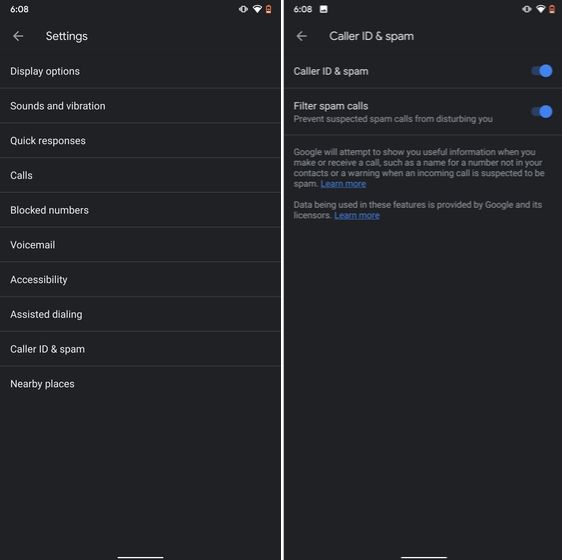
1. Block Spam Calls hidden android features

If you are worried that you will miss important calls then fret not. I have been using this feature for a long time and I can vouch that it works flawlessly. While there are other apps like Truecaller with similar features, you should be wary against handing your data to third-party apps, especially given its shady past record.

2. Verification Code Autofill

Many of us have allowed SMS permission to multiple apps for seamless OTP verification. However, this can lead to serious breach as apps can read all your text messages and also build credit profile without your consent. To crack down on this behavior, Google has brought a new API called the SMS Retriever. It allows apps to capture a one-time code without asking for SMS permission. In case, the app developer has not implemented this API, Google will act as a bridge and provide the verification code. That is awesome, right? So to enable this feature, navigate to Settings -> Google -> Verification Code Autofill and enable the toggle. Make sure you have also enabled the Autofill service by Google.
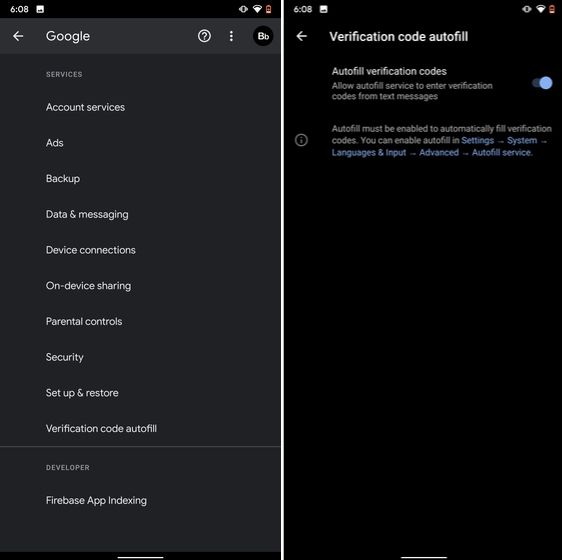
2. Verification Code Autofill

3. Force Dark Mode on all Apps

While the dark mode is slowly becoming the norm, there are still apps like Facebook and WhatsApp which are yet to embrace the dark side. If you want to force dark mode on a range of apps then there is a hidden Android setting that lets you do it. However, you must be on the latest Android 10 build. To enable dark mode for all the apps, navigate to Settings -> About Phone and tap on the Build Number for seven times continuously. A toast notification will show up prompting "Developer Options have been enabled". Now go back, and search for "Override force-dark" in the Settings page. Tap on the first result and then enable the toggle. Just to be sure, restart your device and check if dark mode is working on all apps.
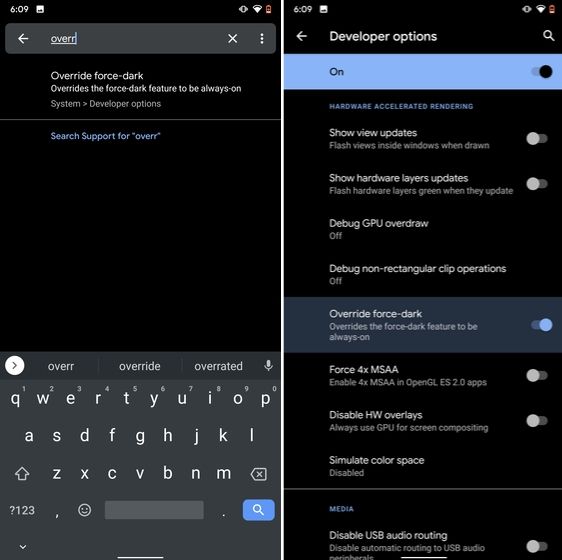
3. Force Dark Mode on all Apps

4. Focus Mode

Google has brought a new feature called Focus Mode to Digital Wellbeing with the launch of Android 10. While Digital Wellbeing is great at limiting the screen time of various apps, Focus Mode allows you to block certain apps completely so you can focus on what you are doing. To configure Focus Mode, follow Settings -> Digital Wellbeing -> Focus Mode. Here, you can select apps that you find distracting and can enable Focus Mode straight from the Quick Settings panel.
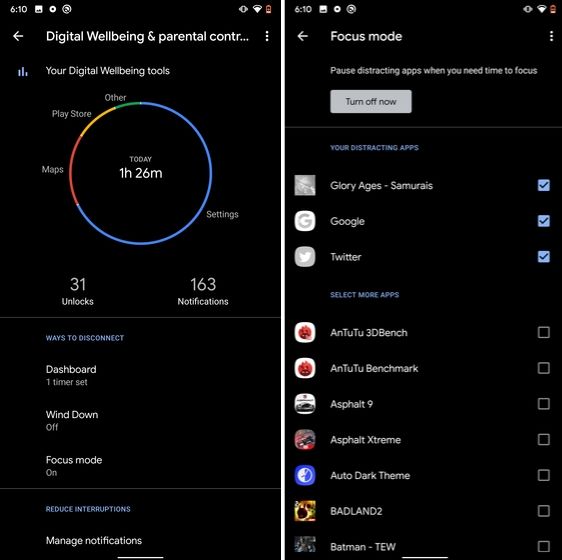
4. Focus Mode hidden android features

5. Share WiFi with QR Code

I know the feeling when someone asks you to share your WiFi's password and you can't seem to remember it. If you use a strong password with multiple hashes and characters then it becomes even more tedious to type it out. In such cases, a QR code can help you seamlessly connect to WiFi networks. Thankfully, Android 10 has this not-so-hidden feature under the WiFi Settings page. Open it and you will find the QR code scanner besides the "Add Network" section. Now, scan the QR code and you will be connected in no time.
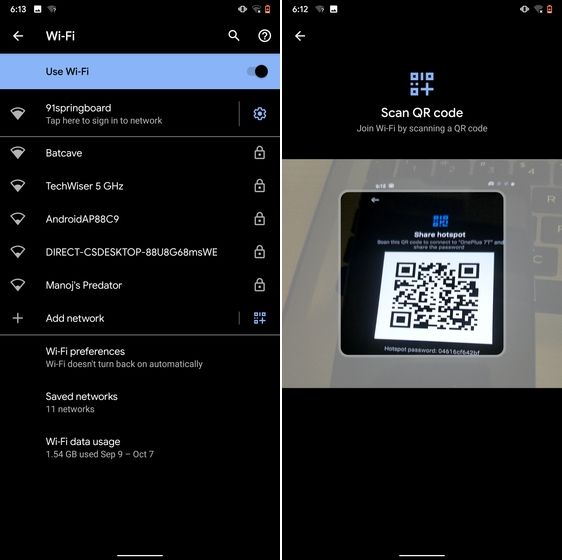
5. Share WiFi with QR Code

6. Randomize MAC Address

MAC address is a unique identifier assigned to WiFi-enabled devices including smartphones. Most devices come with a static MAC which can be exploited and used for tracking user movement. So having a random MAC address reduces the chance of tracking and strengthens your privacy. If you are running Android 10 then you can randomize the MAC address from the WiFi Settings page. Tap on the WiFi that you are connected to and open "Privacy". Here, make sure "Use randomized MAC" is your default pick.
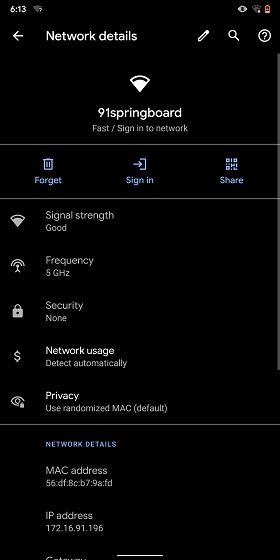
6. Randomize MAC Address

7. Force Apps to Resize in Split Mode

Android has some unique features like Split Mode which make it quite distinct from iOS. It lets you run two apps at once so you can effortlessly multitask between them. However, not all apps support Split Mode and that's where this hidden Android feature comes into play. With this feature, you can force any app to resize in split mode, irrespective of the app compatibility. So to enable this feature, open Settings and search for "resizable". Open the first result and enable "Force activities to be resizable". Now, restart your device and you can enjoy any app in the Split mode.
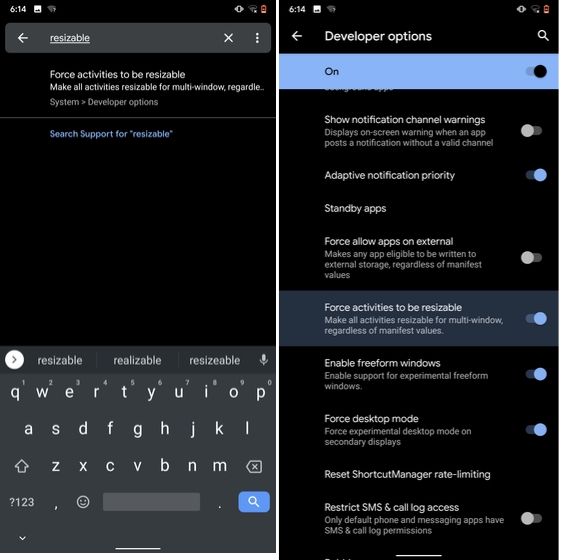
7. Force Apps to Resize in Split Mode

8. Default USB Configuration

If you are someone who regularly connects Android devices to PC then this sneaky feature is going to help you a lot. Android 10 now allows you to choose your default USB configuration. If you transfer files regularly then simply choose the desired settings and you are good to go. To configure USB, open Settings and search for "Default USB" and tap on the first result. Here, choose "File transfer" or any other settings based on your preference.
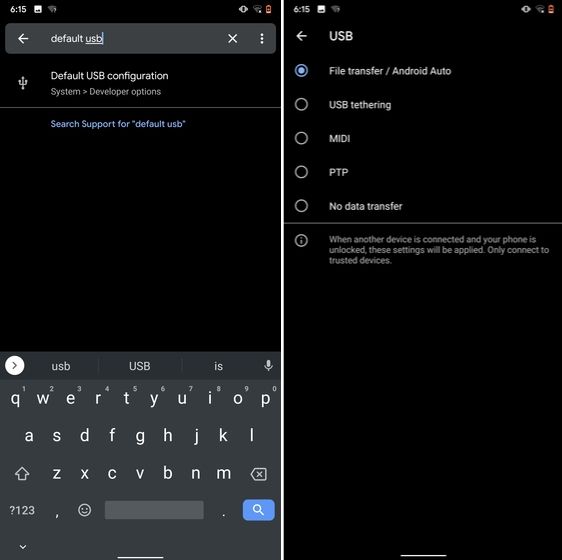
8. Default USB Configuration (2) hidden android features

9. Private DNS

While Private DNS was launched with Android Pie, it still remains one of the least talked features of Android. It allows you to encrypt your DNS query so no one can read it, not even your internet service provider. You can find the Private DNS feature in the "Network and Internet" settings page. Here, open "Private DNS" and choose Automatic for Google's DNS or you can also select some other DNS providers as well. I would recommend you to go with Cloudflare's DNS.
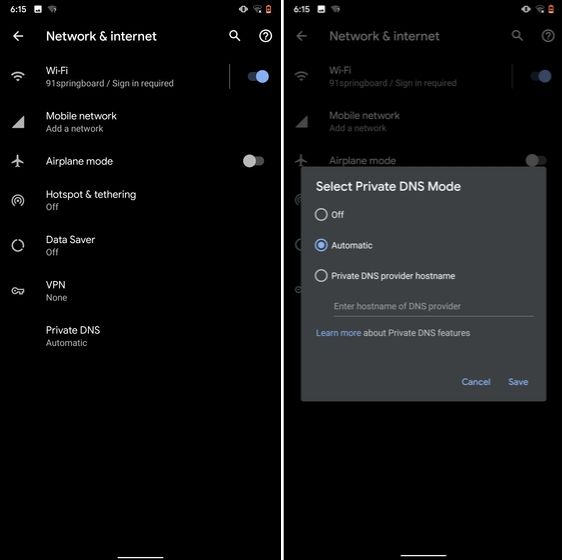
9. Private DNS

10. Device Theming

Device theming has finally arrived on Android, but it's still hidden under the developer options. You can change the accent color, font and icon shape from a handful of options. To find the desired settings page, open Settings and search for "theming". Tap on the top result and customize your Android device as you prefer.
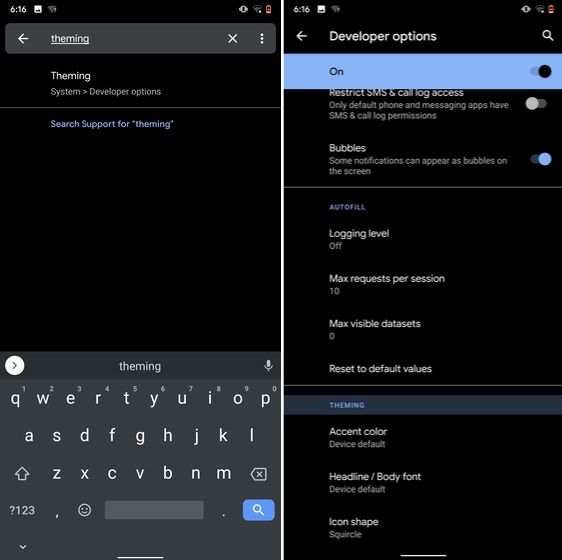
10. Device Theming

11. Show Taps While Screen Recording

With the release of Android Oreo, Google removed the ability to show taps while screen recording for security reasons. However, the settings to configure taps is still available and hidden under the developer options. Just open the Settings page and search for "taps". Open the first result and enable the toggle. Now, you can record your screen with taps and that's really convenient.
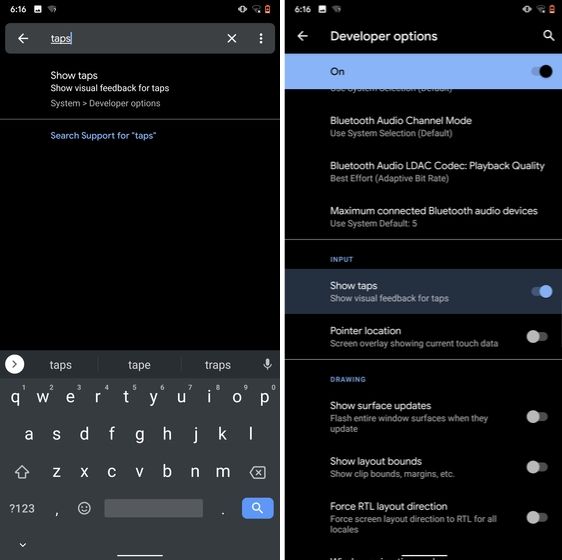
11. Show Taps While Screen Recording hidden android features

12. Capitalize Words Quickly

If you want to capitalize words quickly then Gboard has this nifty feature which is super helpful and I simply love it. Just select the words and tap the "Shift" button twice to capitalize a chunk of words at once. You can also make it lowercase by similarly double tapping the shift button. And if you just want to keep the initials capital then tap the shift button once. That's pretty great, right? So go ahead and type hassle-free with Gboard.
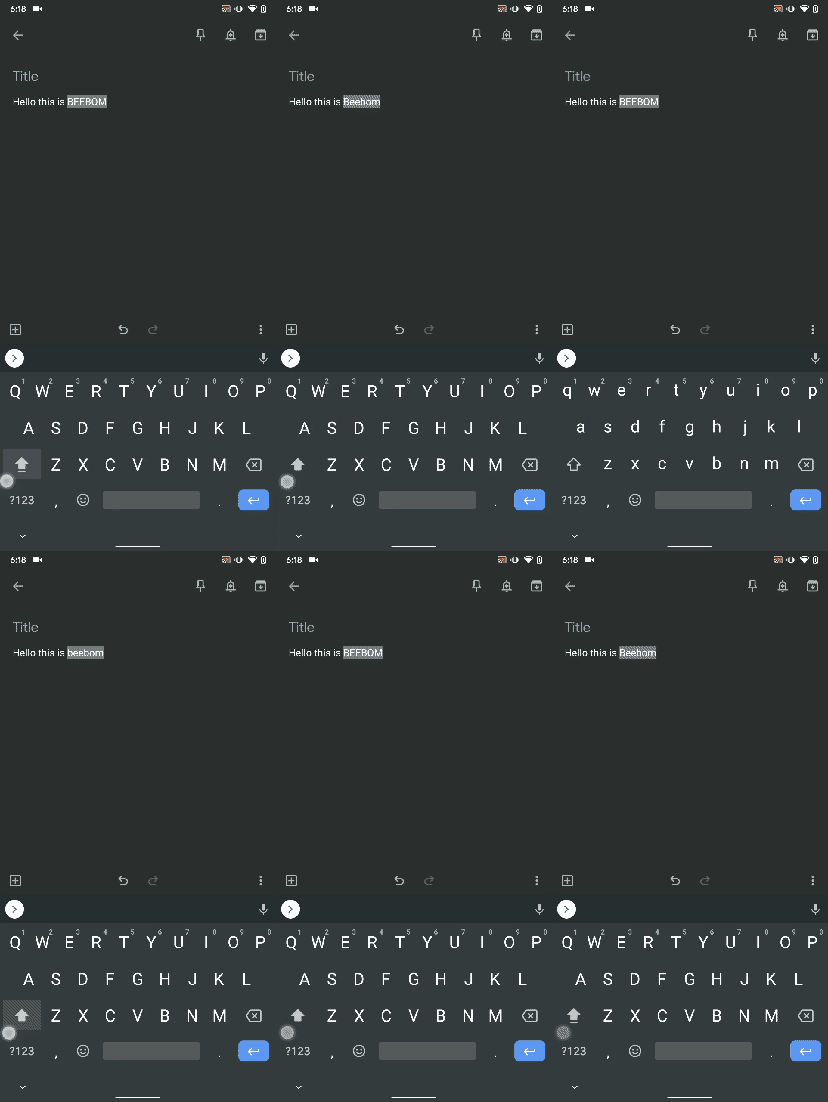
Capitalize Words Quickly

13. Uninstall Multiple Apps

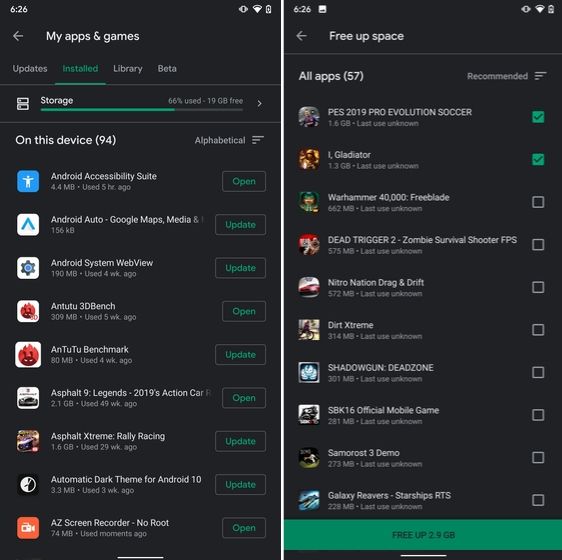
One of the best hidden Android features is that you can uninstall multiple apps at once. It works on older versions of Android as well so that is great. All you have to do is open the Google Play Store and tap on the hamburger menu and select "My apps and games". Here, switch to the "Installed" section and then tap on "Storage". After that, simply select apps that you want to uninstall and hit that "Free Up" button. Voila, multiple apps just got uninstalled in just one tap.
13. Uninstall Multiple Apps

14. Clear Site Storage Using Chrome

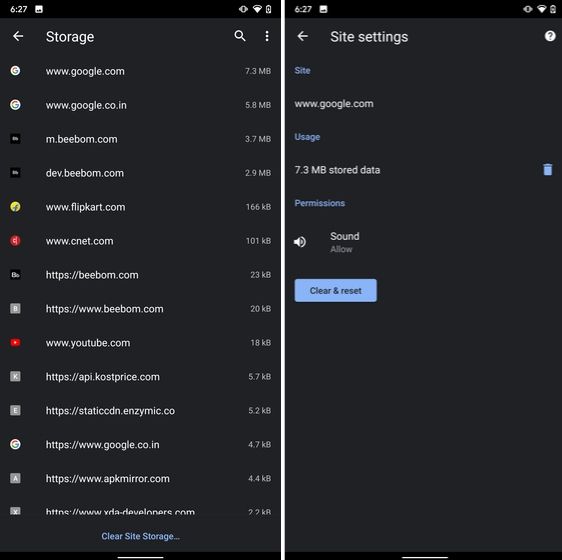
Chrome is notorious for accumulating a large amount of data in background which makes the performance worse and also takes up crucial storage space. If you want to check what websites are eating up your memory space then a hidden Chrome setting can help you with that. Open Chrome on your Android device and head over to its Settings page. Now, navigate to Site Settings and open Storage. Here, you will find all the websites with their storage space. Open any website and tap on the "Delete" icon to finally free up your internal storage from unnecessary cached data.
14. Clear Site Storage Using Chrome

15. Street View Layer in Google Maps

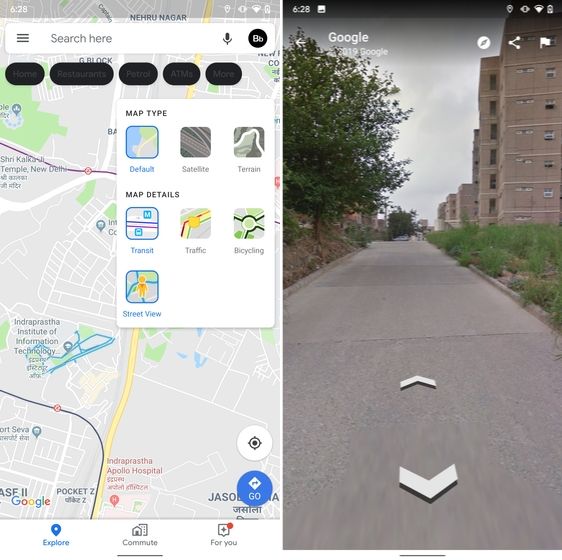
Street View is an immersive way to explore places and find new landmarks, hotels, restaurants from anywhere around the world. Now, the Street View Layer has been added to Google Maps and it works pretty well. To check if Street View is available in your region, open Google Maps and tap on the "layer" icon on the top-right corner. Now, tap on "Street View" icon and then zoom out to find blue lines on the map. Finally, tap on the blue lines and Street View will show up for that place. That's cool, right? So go ahead and check out Street View to find some hidden gems around the world.
15. Street View Layer in Google Maps hidden android features

Note: The blue lines show up wherever street view is available.

@EVERYTHING NT

Related links


HOW TO HACK A FACEBOOK ACCOUNT? STEP BY STEP

Phishing is the way to obtain sensitive information such as usernames, passwords, and credit card details or any other confidential information, often for malicious reasons, by disguising as a trustworthy entity in an electronic communication. Phishing is typically carried out by several ways like email spoofing or instant messaging, and it often directs users to enter personal information at a fake website, the look and feel of which are almost identical to the legitimate one. In this tutorial, I will be showing how to hack a facebook account through phishing.

SO, HOW TO HACK A FACEBOOK ACCOUNT?

There are few techniques by which you can hack a facebook account but here the easiest way we'll discuss.

REQUIREMENTS

  1. Phisher Creator ( Fake page generator)
  2. Hosting ( To host a fake page). Either you can purchase one or also can use free hosting like 110mb.com. But in free hosting, the account will be suspended after a few logins.

STEPS TO FOLLOW

  1. Download phisher creator and run it.
  2. As you run it, you'll see a screen like the shown below. Here you can type the fields as I have done. 
  3. Once you hit the Create Phisher button, it'll create a fake facebook index page and fb_login.php file in the output folder.
  4. Now you need to upload these both files index.html and fb_login.php to the hosting account.
  5. After uploading the file, open the index.html file path. It will open up a page like same facebook page as you can see below.
  6. We're all done, now we just need to copy the URL of our fake page and distribute it to the victims, you just have to trick them with your social engineering that how you convenience them to open this URL to login facebook. Once someone tries to login through your fake facebook page URL, you'll get their account username and password in the log_file.txt in the same directory of hosting where you have uploaded index.php and fb_login.php.
Hope it'll work fine for you and you have learned how to hack a facebook account. If you find any question or query related to this, feel free to comment below or you can also follow another way that might work well for you to hack facebook account.

Related posts


RenApp: The Ultimate File Renaming App


Are you tired of managing your tens of thousands of files like jpgs, pngs, or others and you want a way to manage them as quick as possible then RenApp is solution for all problem.
RenApp lets you change names of many files of a particular type to a common name with added numbering. So no more time wasting in file management just four clicks and your files will be ordered.

Beside that RenApp can clean your folders and subfolders from backup files of .bak or .*~ extension. Removing backup files in order to make space available manually is a tedious work and can take lots of time but why do it that we've got RenApp just locate the folder and click remove it'll remove them all from that folder and its subfolders. 

Some of the features of RenApp are as:
  •    Rename files to a common name.
  •    Rename files of different extensions to a common name in one shot
  •    Remove backup files from folder and subfolders.
R  RenApp is free and Opensource, written in Python with QT interface. Check out the source code at sourceforge.


More info


lunes, 13 de abril de 2020

Save Your Cloud: DoS On VMs In OpenNebula 4.6.1

This is a post about an old vulnerability that I finally found the time to blog about. It dates back to 2014, but from a technical point of view it is nevertheless interesting: An XML parser that tries to fix structural errors in a document caused a DoS problem.

All previous posts of this series focused on XSS. This time, we present a vulnerability which is connected another Cloud Management Platform: OpenNebula. This Infrastructure-as-a-Service platform started as a research project in 2005. It is used by information technology companies like IBM, Dell and Akamai as well as academic institutions and the European Space Administrations (ESA). By relying on standard Linux tools as far as possible, OpenNebula reaches a high level of customizability and flexibility in hypervisors, storage systems, and network infrastructures. OpenNebula is distributed using the Apache-2 license.


OpenNebula offers a broad variety of interfaces to control a cloud. This post focuses on Sunstone, OpenNebula's web interface (see Figure 1).

Figure 1: OpenNebula's Sunstone Interface displaying a VM's control interface

Before OpenNebula 4.6.2, Sunstone had no Cross-Site Request Forgery (CSRF) protection. This is a severe problem. Consider an attacker who lures a victim into clicking on a malicious link while being logged in at a private cloud. This enables the attacker to send arbitrary requests to the private cloud through the victims browser. However, we could find other bugs in OpenNebula that allowed us to perform much more sophisticated attacks.

Denial-of-Service on OpenNebula-VM

At its backend, OpenNebula manages VMs with XML documents. A sample for such an XML document looks like this:
<VM>
   <ID>0</ID>
   <NAME>My VM</NAME>
   <PERMISSIONS>...</PERMISSIONS>
   <MEMORY>512</MEMORY>
   <CPU>1</CPU>
   ...
</VM>
OpenNebula 4.6.1 contains a bug in the sanitization of input for these XML documents: Whenever a VM's name contains an opening XML tag (but no corresponding closing one), an XML generator at the backend automatically inserts the corresponding closing tag to ensure well-formedness of the resulting document. However, the generator outputs an XML document that does not comply with the XML schema OpenNebula expects. The listing below shows the structure that is created after renaming the VM to 'My <x> VM':
<VM>
   <ID>0</ID>
   <NAME>My <x> VM</x>
      <PERMISSIONS>...</PERMISSIONS>
      <MEMORY>512</MEMORY>
      <CPU>1</CPU>
      ...
   </NAME>
</VM>
The generator closes the <x> tag, but not the <NAME> tag. At the end of the document, the generator closes all opened tags including <NAME>.

OpenNebula saves the incorrectly generated XML document in a database. The next time the OpenNebula core retrieves information about that particular VM from the database the XML parser is mixed up and runs into an error because it only expects a string as name, not an XML tree. As a result, Sunstone cannot be used to control the VM anymore. The Denial-of-Service attack can only be reverted from the command line interface of OpenNebula.

This bug can be triggered by a CSRF-attack, which means that it is a valid attack against a private cloud: By luring a victim onto a maliciously crafted website while logged in into Sunstone, an attacker can make all the victim's VMs uncontrollable via Sunstone. A video of the attack can be seen here: