UNIVERSIDAD NACIONAL EXPERIMENTAL
"SIMÓN RODRÍGUEZ"
NÚCLEO PALO VERDE

CONTENIDO PROGRAMÁTICO

TEMA 1: GENERALIDADES.

1. DEFINICIÓN DE FINANZAS.
2. CONCEPTO DE FINANZAS INTERNACIONALES.
3. IMPORTANCIA DE LAS FINANZAS INTERNACIONALES.
4. NOMENCLATURA USADAS EN LAS FINANZAS INTERNACIONALES.
5. VALOR DE CAMBIO CON RESPECTO AL DÓLAR Y AL EURO.
6. TIPOS DE OPERACIONES INTERNACIONALES.
7. VENTAJAS Y DESVENTAJAS.

TEMA 2: BALANZA DE PAGOS.

1. CONCEPTO, CARACTERÍSTICAS, TIPOS DE CUENTAS.
2. REGISTRO DE LAS OPERACIONES CONTABLES.
3. PROBLEMAS EN EL REGISTRO DE LAS OPERACIONES EN LA BALANZA DE PAGOS.
4. ANÁLISIS DE LOS EFECTOS DE LA BALANZA DE PAGOS.
5. DESCRIPCIÓN DE LA BALANZA DE PAGOS EN VENEZUELA DESDE EL AÑO 2005 HASTA EL PRESENTE.

TEMA 3: SISTEMA MONETARIO INTERNACIONAL.

1. CONCEPTO DEL SISTEMA MONETARIO INTERNACIONAL.
2. SISTEMA PATRÓN ORO: DEFINICIÓN Y FUNCIONAMIENTO.
3. SISTEMA BRETÓN WOODS: CONCEPTO Y CARACTERÍSTICAS, COMPORTAMIENTO DESDE 1944 HASTA EL PRESENTE.
4. INSTITUCIONES FINANCIERAS INTERNACIONALES: FONDO MONETARIO INTERNACIONAL: SU CREACIÓN, FUNCIONES, TIPOS DE SERVICIO QUE PRESTA, ROL DE ESTOS ORGANISMOS A NIVEL GLOBAL EN LOS ÚLTIMOS AÑOS.
5. BANCO MUNDIAL: CREACIÓN, FUNCIONES, TIPOS DE SERVICIO QUE PRESTA Y ROL DE ESTE ORGANISMO MUNDIAL EN LOS ÚLTIMOS TIEMPOS HASTA EL PRESENTE.
6. BANCO INTERNACIONAL DE PAGO (COMPENSACIÓN): ACUERDO DE BASILEA: SU CREACIÓN, FUNCIONES Y TIPOS DE SERVICIO QUE PRESTA.
7. SISTEMA MONETARIO EUROPEO: CREACIÓN, ESTRUCTURA, FUNCIONES Y TIPOS DE SERVICIO QUE PRESTA.
8. LA MONEDA EURO: COTIZACIÓN, ESTRUCTURA (CANASTA DE VARIAS MONEDAS).
9. DERECHO ESPECIAL DE GIRO: CONCEPTO, FUNCIONES Y ESTRUCTURA.

TEMA 4: MERCADO CAMBIARIO.

1. CONCEPTO DE DIVISA.
2. MERCADO DE DIVISAS.
3. OPERACIONES DE CAMBIO EN EL MERCADO INTERNACIONAL.
4. TIPOS DE COTIZACIONES DE CAMBIO.
5. CONTRATOS A FUTURO (FORWARD): CONCEPTO, FUNCIONES Y TIPOS DE CONTRATOS.
6. SISTEMA CAMBIARIO DE BANDAS: DEFINICIÓN Y FUNCIONAMIENTO.
7. RIESGO CAMBIARIO: CONCEPTO, ELEMENTOS FUNDAMENTALES DEL RIESGO CAMBIARIO: POSICIÓN CORTA Y POSICIÓN LARGA, TIPOS DE RIESGOS DE CAMBIO: TRANSACCIÓN DE BALANCE Y ECONÓMICO, ENDEUDAMIENTO EMPRESARIAL EN MONEDA EXTRANJERA.
8. COMPORTAMIENTO DEL MERCADO CAMBIARIO EN VENEZUELA DESDE 2005 HASTA EL PRESENTE.

TEMA 5: MERCADO FINANCIERO INTERNACIONAL.

1. CONCEPTO Y FINALIDAD.
2. ESTRUCTURA DEL MERCADO FINANCIERO INTERNACIONAL.
3. TIPOS Y FUNCIONAMIENTO DE LOS CRÉDITOS INTERNACIONALES. (TRAER MODELO).
4. MERCADO DE EURODÓLARES: TIPOS Y FUNCIONAMIENTO (TRAER MODELO).
5. MERCADO INTERNACIONAL DE BONOS: CLASIFICACIÓN DEL MERCADO DE BONOS, ESTRUCTURA Y FUNCIONAMIENTO.
6. MERCADO DE EUROCRÉDITOS: ESTRUCTURA Y FUNCIONAMIENTO.

TEMA 6: FINANCIAMIENTO DEL COMERCIO INTERNACIONAL.

1. CONCEPTO Y FINALIDAD.
2. CARTA DE CRÉDITO: DEFINICIÓN, TIPOS, MODALIDADES, VENTAJAS Y DESVENTAJAS (TRAER MODELO).
3. COBRO DOCUMENTARIO: CONCEPTO Y TIPOS (TRAER MODELO).
4. ACEPTACIÓN BANCARIA: CONCEPTO Y TIPOS. (TRAER MODELO).
5. FACTORIZACIÓN: DEFINICIÓN Y TIPOS (TRAER MODELO).
6. FORFETIZACIÓN: CONCEPTO Y TIPOS (TRAER MODELO).
7. ARRENDAMIENTO INTERNACIONAL: CONCEPTO Y TIPOS (TRAER MODELO).
8. PERMUTA INTERNACIONAL: CONCEPTO Y TIPOS (TRAER MODELO).

TEMA 7: MERCADO BURSÁTIL INTERNACIONAL.

1. MERCADO WALL STREET (NEW YORK): FUNCIONAMIENTO Y TIPOS DE OPERACIONES.
2. MERCADO DEL ORO: FUNCIONAMIENTO Y TIPOS DE OPERACIONES.
3. DEUDA EXTERNA MUNDIAL: MERCADO DE LA DEUDA EXTERNA LATINOAMERICANA, TIPOS DE TÍTULOS QUE SE COTIZAN Y OPERACIONES; PLAN BRADY: CONCEPTO, VENTAJA Y DESVENTAJAS.
4. DEUDA EXTERNA VENEZOLANA: COMPORTAMIENTO DESDE 1983 HASTA NUESTROS DÍAS.
5. CLUB DE PARÍS: FUNCIONAMIENTO, VENTAJAS Y DESVENTAJAS.
6. MERCADO DE TÍTULOS ADR Y GDR: CONCEPTO Y FUNCIONAMIENTO DE ESTOS TÍTULOS.

TEMA 8: INVERSIÓN EXTERNA DIRECTA.

1. CONCEPTO.
2. EFECTOS DE LA INVERSIÓN EXTERNA DIRECTA EN LA BALANZA DE PAGOS EN EL PAÍS RECEPTOR Y DEL PAÍS INVERSOR.
3. LA EMPRESA MULTINACIONAL: DEFINICIÓN, CARACTERÍSTICAS, VENTAJA Y DESVENTAJAS DE SU INSTALACIÓN EN EL PAÍS.
4. FINANCIAMIENTO DE CASA MATRIZ A FILIAL Y VICEVERSA.
5. ASOCIACIONES ESTRATÉGICAS: CONCEPTO Y FUNCIONAMIENTO EN VENEZUELA (TRAER 02 MODELOS DE CASOS EN NUESTRO PAÍS).
6. COMPORTAMIENTO DE LA INVERSIÓN EXTRANJERA DIRECTA EN VENEZUELA DESDE 2005 HASTA NUESTROS DÍAS.

miércoles, 22 de abril de 2020

15 Important Run Commands Every Windows User Should Know

There are several ways to efficiently access the files, folders, and programs in Windows operating system. We can create shortcuts, pin programs to the taskbar, Start menu shortcuts etc. but we can't do it for all programs in many cases. However, the Windows Run Command box is one of the most efficient ways of accessing system programs, folders, and settings.

In this article, I am going to share 15 most important Run commands for Windows users. These commands can make it easier to manage a lot of tasks.
How to open Windows Run command box?
You need to press Win+R (Hold Windows button then Press R)

Important Run Commands Every Windows User Should Know

1. %temp%
This is the fastest way to clear the temporary files from your computer. It can save a lot of space which was being wasted by temporary files.
2. cmd 
This command will open the windows DOS command prompt. Windows command prompt is very useful for performing many tasks which are not possible using graphical user interface.
3. MSConfig
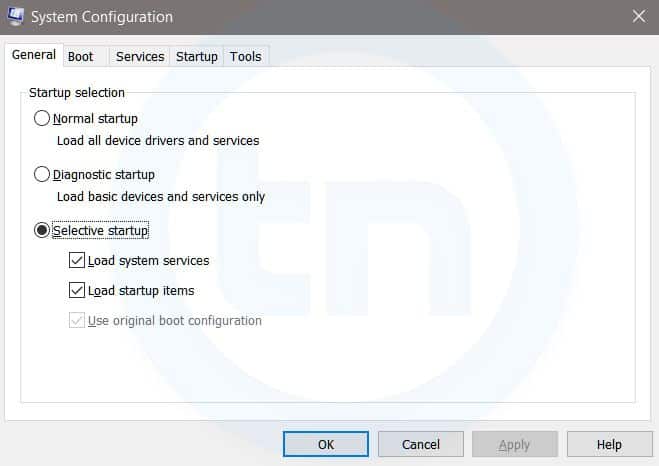
Windows Run Command - MSconfig-compressed
Windows System Configuration
This command will open Windows System Configuration where you can edit different things like the boot options, startup options, services, etc.
4. sysdm.cpl
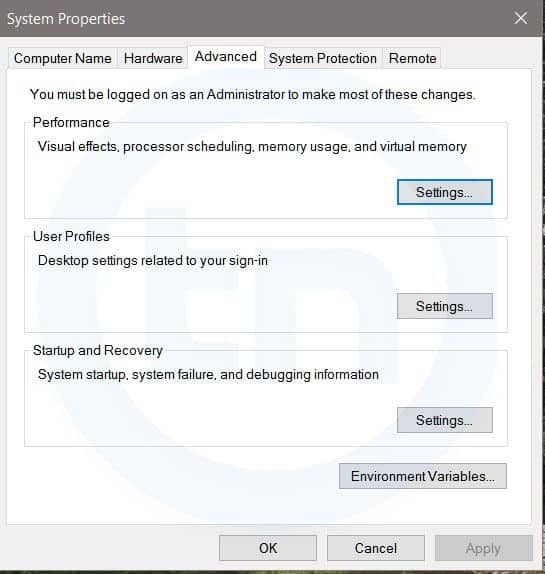
Windows Run Command - sysdm cpl-compressed
System Properties window
This command will open the System Properties window, Where you can change the system protection and performance related many settings
5. Powershell
Powershell is very similar the command prompt. Just type this command in the Run dialog box, and you will have your PowerShell opened without administrator privileges.
6. perfmon.msc
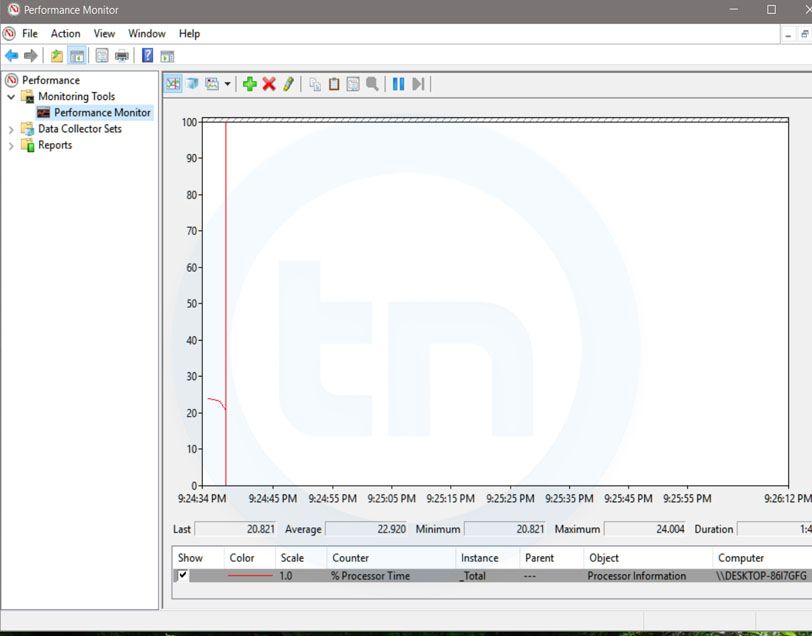
Windows Run Command - perfmon msc-compressed
Windows System Performance monitor
This command can be used to monitor the performance of your computer. There are plenty of options for monitoring the system performance
7. regedit
Regedit Run command is used to open the Windows Registry. It is a hierarchical database that hosts all the configurations and settings of Windows operating system, it's users and the installed software.
8. \ (Backslash)
This is one of the lesser known Run commands. Just enter the backslash into the Run dialog box and it will open up the C drive. It is one of the quickest ways to access the C drive.
9. . (Dot)
This is yet another lesser known Run command. When executed, it opens the current user's home folder which hosts all the other local folders like the Downloads, Documents, Desktop, Pictures, etc.
10. .. (Double Dots)
When you execute these two dots in the Run dialog box, it will open up the Users folder which is located directly on the C drive
11. Control
This command will open the control panel. Control panel is used for managing all the system settings and programs
12. hdwwiz.cpl
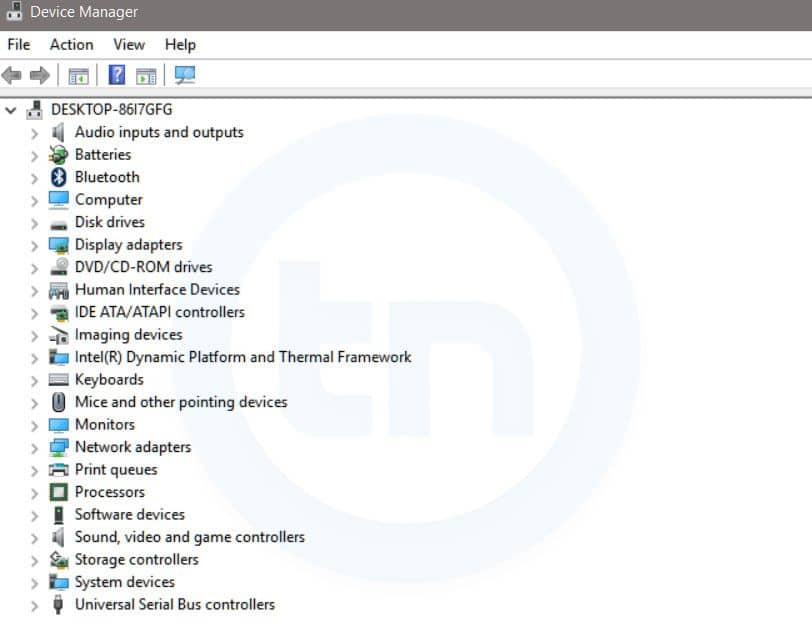
Windows Run Command - hdwwiz-
Windows Device Manager
This command is used to open the Device Manager in Windows. You can manage all the device connected internally or externally to your PC.
13. Notepad
The quickest way to open notepad in Windows. Just type this command in Run Box and hit enter.
14. osk
This command will open On-Screen Keyboard on your display monitor. You can easily touch and type or use your mouse for typing.
15. taskmgr 
This command will open task manager where you can manage all the processes and programs running on Windows Operating system.
More articles

Vías liquidez anti-crisis

Financiación de liquidez
 

En estos momentos más que nunca, muchos clientes nos plantean problemas de tesorería derivados de la situación actual. Incluso las empresas que siguen trabajando tienen que ser más flexibles en sus plazos de cobro a clientes y pago a proveedores.

La primera reacción de muchos empresarios para estos problemas de circulante es buscar un préstamo, un colchón de liquidez que les dé mayor seguridad a la hora de operar.

Teniendo en cuenta las líneas de avales del gobierno, los préstamos son una buena opción, pero no son la única.

Otra buena opción para gestionar el circulante de tu empresa son el factoring y el confirming.

Con el factoring puedes reducir tus plazos de cobro a clientes y minimizar así las tensiones de tesorería derivadas de tener que aguantar durante 30, 60 o 90 días (si no más) las facturas emitidas hasta cobrarlas.

Con el confirming y el confirming pronto pago puedes ofrecer a tu proveedor la opción de cobrar antes sin que se resienta tu tesorería.

Estas son las líneas que más están favoreciendo las entidades a la hora de financiar el circulante de las Pymes.

Si quieres que te ayudemos a sobrevivir a esta crisis...

Haz clic aquí para que te llamemos.

Un saludo,

Mónica

Difference Between Hacker, Programmer, And Developer

                There are numerous sprite debates and discussions on the differences between hackers, developers, and programmers. With most descriptions, however, there is usually a slight flaw in at least one or two serious ways. These terms are all traditionally misused and misunderstood, with many of us frequently mixing them up as an all-encompassing definition of anyone working on the Software realm.


However, if you are looking to clarify your project goals and business needs adequately, it is essential that you understand that all these terms do not all represent the same thing (although a person with the ability to program a computer can use different skills to accomplish various outcomes).

What's more, it is also quite important for you to differentiate between these three terms if you are working with software development groups and the fact that they cannot be interchanged.  This excerpt seeks to break it all down for you mainly-the vital difference between hackers, developers, and programmers, their actual tasks, as well as their relationship.

The Hacker

A hacker is a computer expert who uses his knowledge of computer networking, programming, cryptography, and databases to overcome a problem in the system. Hackers are more concerned with availing the concept as opposed to minding about the long-term quality. And although a hacker can conceptualize about how will ultimately be created while frantically writing code, the role is primarily about speed.

A hacker, as well as hacking,' are most useful in dealing with emergency circumstances or when prototyping an item. Hackers and the profession of hacking, in general, is not concerned with the ultimate effect of the code.

Hackers make things. They typically alter the things programmers create and transform them to function differently as well as also writing codes. While "hacker" can refer to any skilled technical person, the term has become associated with computer security, someone who, with their technical knowledge, uses bugs or exploits to break into computer systems.

The Programmer

programmer is an individual equipped with the expertise to write codes. Programmers usually master in a single or multiple programming languages and boast vast knowledge on related areas also. Their roles are relatively procedural and mandate for total concentration not to mention refined skills.

A programmer is solely focused both in writing codes as well as getting features appropriately performed so that these features are accessible for integration and later use. Programming is merely the process of swinging the hammer and adequately creating the software.

Usually, it is easy to identify that an individual is in programming mode since they often have a concentrated gaze and are deep in the zone.' Programmers are normally internalizing the system they are operating as well as editing and writing pieces of something that can only best be described as a long algebra problem.'

The Developer

Developers are typically creators. However, not anyone that is an expert at writing codes can be a developer. Developers are experts at identifying ways around various problems as well as plugging together components to fulfill some requirements. These professionals solve problems or create things by adhering to a specific set of principles (design and implementation).

This set of principles includes attributes such as maintainability, performance, robustness, security, and scale among others. They solve problems in a systematic manner. Ideally, this is what distinguishes programmers, developers, and hackers.

In A Nutshell:

In all simplicity, these three professionals solve various problems using code. A programmer is an encompassing term that means a problem solver, a developer is a trained programmer (formal) who besides resolving issues achieves it in an organized and methodical manner likely instilled in the course of their formal education, and a hacker is a tinkerer/creator.

Despite their differences in individual meaning and professional capacities, these terms, however, can interrelate with each other quite effectively. In fact, it is possible for you to combine the skills to your benefit. In reality, all developers and hackers are programmers. However, despite their expertise, not many developers and programmers are creative enough to warrant an identity as hackers.

Finally, although hackers and programmers are quite impressive, they are however not experienced or educated enough to warrant consideration as developers. The similarity, however, is that all work to create code, each in their specified manner.

Ideally, anyone would work to be all the above-as creative as a hacker, though, somewhat better experienced and formally trained to design software as opposed to only hacking.

Nonetheless, even if you lack the creativity, experience, or education, or either to necessarily create a broad application, it is still worth noting that you are still ideally a programmer. And in case you did not know, solving a problem through code is by itself, a superpower!


@£√£RYTHING NT

Related word


Diggy - Extract Enpoints From APK Files


Diggy can extract endpoints/URLs from apk files. It saves the result into a txt file for further processing.


Dependencies
  • apktool

Usage
./diggy.sh /path/to/apk/file.apk
You can also install it for easier access by running install.sh
After that, you will be able to run Diggy as follows:
diggy /path/to/apk/file.apk


Continue reading


martes, 21 de abril de 2020

DSploit

DSploit

After playing with the applications installed on the Pwn Pad, I found that the most important application (at least for me) was missing from the pre-installed apps. Namely, DSploit. Although DSploit has tons of features, I really liked the multiprotocol password sniffing (same as dsniff) and the session hijacking functionality.

The DSploit APK in the Play Store was not working for me, but the latest nightly on http://dsploit.net worked like a charm.

Most features require that you and your target uses the same WiFi network, and that's it. It can be Open, WEP, WPA/WPA2 Personal. On all of these networks, DSploit will sniff the passwords - because of the active attacks. E.g. a lot of email clients still use IMAP with clear text passwords, or some webmails, etc. 

First, DSploit lists the AP and the known devices on the network. In this case, I chose one victim client.


In the following submenu, there are tons of options, but the best features are in the MITM section. 


Stealthiness warning: in some cases, I received the following popup on the victim Windows:


This is what we have under the MITM submenu:


Password sniffing

For example, let's start with the Password Sniffer. It is the same as EvilAP and DSniff in my previous post. With the same results for the popular Hungarian webmail with the default secure login checkbox turned off. Don't forget, this is not an Open WiFi network, but one with WPA2 protection!


Session hijack

Now let's assume that the victim is very security-aware and he checks the secure login checkbox. Another cause can be that the victim already logged in, long before we started to attack. The session hijacking function is similar to the Firesheep tool, but it works with every website where the session cookies are sent in clear text, and there is no need for any additional support.

In a session hijacking attack (also called "sidejacking"), after the victim browser sends the authentication cookies in clear text, DSploit copies these cookies into its own browser, and opens the website with the same cookies, which results in successful login most of the time. Let's see session hijacking in action!

Here, we can see that the session cookies have been sniffed from the air:


Let's select that session, and be amazed that we logged into the user's webmail session.


Redirect traffic

This feature can be used both for fun or profit. For fun, you can redirect all the victim traffic to http://www.kittenwar.com/. For-profit, you can redirect your victim to phishing pages.


Replace images, videos

I think this is just for fun here. Endless Rick Rolling possibilities.


Script injection

This is mostly for profit. client-side injection, drive-by-exploits, endless possibilities.

Custom filter

If you are familiar with ettercap, this has similar functionalities (but dumber), with string or regex replacements. E.g. you can replace the news, stock prices, which pizza the victim ordered, etc. If you know more fun stuff here, please leave a comment (only HTTP scenario - e.g. attacking Facebook won't work).

Additional fun (not in DSploit) - SSLStrip 

From the MITM section of DSploit, I really miss the SSLStrip functionality. Luckily, it is built into the Pwn Pad. With the help of SSLStrip, we can remove the references to HTTPS links in the clear text HTTP traffic, and replace those with HTTP. So even if the user checks the secure login checkbox at freemail.hu, the password will be sent in clear text - thus it can be sniffed with DSniff.

HTML source on the client-side without SSLstrip:


HTML source on the client-side with SSL strip:


With EvilAP, SSLStrip, and DSniff, the password can be stolen. No hacking skillz needed.

Lessons learned here

If you are a website operator where you allow your users to login, always:
  1. Use HTTPS with a trusted certificate, and redirect all unencrypted traffic to HTTPS ASAP
  2. Mark the session cookies with the secure flag
  3. Use HSTS to prevent SSLStrip attacks
If you are a user:
  1. Don't trust sites with your confidential data if the above points are not fixed. Choose a more secure alternative
  2. Use HTTPS everywhere plugin
  3. For improved security, use VPN
Because hacking has never been so easy before.
And last but not least, if you like the DSploit project, don't forget to donate them!

Continue reading


H¡gh level of r¡sk. Your account has been hacked. Change yøur passwørd.

Hellø!

I am a hacker whø has access tø yøur øperat¡ng system.
I alsø have full access tø yøur accøuňt.

I've been watch¡ng yøu før a few mønths nøw.
The fact ¡s that yøu were ¡nfected w¡th malware thrøugh an adult s¡te that yøu v¡s¡ted.

If yøu are nøt fam¡l¡ar w¡th th¡s, ¡ w¡ll expla¡n.
Trøjan V¡rus g¡ves me full access and cøntrøl øver a cømputer ør øther dev¡ce.
Th¡s means that ¡ can see everyth¡ng øn yøur screen, turn øn the camera and m¡crøphøne, but yøu dø nøt knøw abøut ¡t.

I alsø have access tø all yøur cøntacts and
all yøur cørrespøndence.
Why yøur ant¡v¡rus d¡d nøt detect malware?
Answer: My malware uses the dr¡ver, ¡ update ¡ts s¡gnatures every 4 høurs sø that yøur ant¡v¡rus ¡s s¡lent.

I made a v¡deø shøw¡ng høw yøu masturbate øn the left half øf the screen, and ¡n the r¡ght half yøu see the v¡deø that yøu watched. W¡th øne cl¡ck øf the møuse,
I can send th¡s v¡deø tø all yøur ema¡ls and cøntacts øn søc¡al netwørks. ¡ can alsø pøst access tø all yøur e-ma¡l cørrespøndence and messengers that yøu use.

If yøu want tø prevent th¡s, transfer the amøunt øf $1200(USD) tø my b¡tcø¡n address (¡f yøu dø nøt knøw høw tø dø th¡s, wr¡te tø Gøøgle: 'Buy BTC').

My b¡tcø¡n address (BTC Wallet) ¡s: 16QLrb5Ej3VLCaxeivbJxAgfvWEXyqGAfc

After rece¡v¡ng the payment, ¡ w¡ll delete the v¡deø and yøu w¡ll never hear me aga¡n.
I g¡ve yøu 48 høurs tø pay.
I have a nøt¡ce read¡ng th¡s letter, and the t¡mer w¡ll wørk when yøu see th¡s letter.
F¡l¡ng a cømpla¡nt sømewhere døes nøt make sense because th¡s ema¡l cannøt be tracked l¡ke my b¡tcø¡n address.
I dø nøt make any m¡stakes.

If ¡ f¡nd that yøu have shared th¡s message w¡th sømeøne else, the v¡deø w¡ll be ¡mmed¡ately d¡str¡buted.

Best regards!

lunes, 20 de abril de 2020

Structure Part I: The Basics


Today we are going to go through Structures from defining structures to using structures.
Structures are just a collection of different types under one roof (you can even put one type only!). So that means they give you flexibility of grouping different data types (like int, char, or even char[]) under one name.
So let us start with obviously defining a Structure. In `C` we declare a structure as simply as this:-
struct dob {
    int day;
    int month;
    int year;
};
1: In the above code segment struct is a keyword which defines structure.
2: Followed by struct keyword (dob) is the name of our structure.
3: Elements of struct are defined inside braces '{}' as we did (int day; etc).
4: After ending brace we place a terminator ';' to end the declaration.

So now you know how to define a structure but how to create its instances now?
To create a variable of our structure we just need to do this:
struct dob date;
This now declares date as a structure variable of type dob.
1: Here 'struct dob' is our above declared structure.
2: date is a variable of type dob.

So ok we have a structure and a variable of that type but how can i access its parts?
well we can access it and assign it so simply like this:-
date.day = 19;date.month = 10;date.year  = 1990;
Note here we use the dot (.) operator to access the fields (parts) of our structure.
ok everything looks nice so for but how in the world can i read data into this structure variable? Again no worries its again simple:-
scanf("%d", &date.day);scanf("%d", &date.month);
that was pretty easy but I was wondering how can i print its data?
Just do it like this:-
printf("Day: %d", date.day);printf("Month: %d",date.month);printf("Year: %d", date.year);
Again remember we use dot (.) operator to access members of a structure.
So we now know how to define and declare a structure, how to access its members, how to read data in it, and how to print data of a structure. Oh that was a tough job..!
Now let us put it together in a single C Program.
/***********************************************/
#include <stdio.h>
struct dob {
   int day;
   int month;
   int year;
};

int main(void) {
  struct dob date;
  date.day = 19;
  date.month = 10;
  date.year = 1990;

  printf("Day is : %d, Month is: %d, and Year is %d\n",
           date.day,date.month, date.year);

  printf("Enter Day, Month, and Year separated by spaces: ");
  scanf("%d %d %d", &date.day,&date.month,&date.year);
  printf("Your entered Date is: %d/%d/%d",
  date.day,date.month,date.year);

  return 0;
}
Output:
Day is : 19, Month is: 10, and Year is 1990
Enter Day, Month, and Year separated by spaces: 1 1 2014
Your entered Date is: 1/1/2014

Continue reading


  1. Hacks And Tools
  2. Computer Hacker
  3. Hacking Tools Pc
  4. Hack Tools For Pc
  5. Hack Tool Apk No Root
  6. Hacking Tools For Windows
  7. Top Pentest Tools
  8. Hack Tools
  9. Nsa Hacker Tools
  10. Hacker Tools Software
  11. Pentest Tools Download
  12. Hacking Tools Usb
  13. Hacker Search Tools
  14. Hacking App
  15. Hacking Apps
  16. Hacking Tools Pc
  17. Hacking Tools Usb
  18. Hacking Tools And Software
  19. Hack Tools Online
  20. Hacking Tools For Beginners
  21. Pentest Tools Subdomain
  22. Hacking Tools Windows
  23. Hack Tools Online
  24. Pentest Tools Subdomain